<?xml version="1.0" encoding="utf-8"?>
<feed xmlns="http://www.w3.org/2005/Atom">
    <id>https://kayzee3327.github.io/the-cuda-cache/blog</id>
    <title>The CUDA Cache Blog</title>
    <updated>2026-05-13T00:00:00.000Z</updated>
    <generator>https://github.com/jpmonette/feed</generator>
    <link rel="alternate" href="https://kayzee3327.github.io/the-cuda-cache/blog"/>
    <subtitle>The CUDA Cache Blog</subtitle>
    <icon>https://kayzee3327.github.io/the-cuda-cache/img/favicon.ico</icon>
    <entry>
        <title type="html"><![CDATA[[A] Dissecting the Volta Architecture: Notes]]></title>
        <id>https://kayzee3327.github.io/the-cuda-cache/blog/volta-details-via-microbenchmarking</id>
        <link href="https://kayzee3327.github.io/the-cuda-cache/blog/volta-details-via-microbenchmarking"/>
        <updated>2026-05-13T00:00:00.000Z</updated>
        <summary type="html"><![CDATA[My notes on the article Dissecting the NVIDIA Volta GPU Architecture via Microbenchmarking. The Volta architecture fundamentally changes how AI computes. There are so many designs that still make an impact on latest architectures. I will dive into these same-in-Volta topics mentioned in Dissecting the NVIDIA Ampere GPU Architecture via Microbenchmarking:]]></summary>
        <content type="html"><![CDATA[<p>My notes on the article <a href="https://arxiv.org/pdf/1804.06826" target="_blank" rel="noopener noreferrer" class="">Dissecting the NVIDIA Volta GPU Architecture via Microbenchmarking</a>. The Volta architecture fundamentally changes how AI computes. There are so many designs that still make an impact on latest architectures. I will dive into these same-in-Volta topics mentioned in <a href="https://www.nvidia.com/en-us/on-demand/session/gtcspring21-s33322/" target="_blank" rel="noopener noreferrer" class="">Dissecting the NVIDIA Ampere GPU Architecture via Microbenchmarking</a>:</p>
<ul>
<li class="">Instruction Encoding</li>
<li class="">Dual-Port Register</li>
</ul>
<h2 class="anchor anchorTargetStickyNavbar_Vzrq" id="instruction">Instruction<a href="https://kayzee3327.github.io/the-cuda-cache/blog/volta-details-via-microbenchmarking#instruction" class="hash-link" aria-label="Direct link to Instruction" title="Direct link to Instruction" translate="no">​</a></h2>
<p>Volta uses one 128-bit word to encode each instruction together with its corresponding control information. Previous architectures use a 64-bit word to encode each instruction, and a separate 64-bit word to encode control information associated to multiple instructions. The author finds that</p>
<ul>
<li class="">at least 91 bits are used to encode the instruction</li>
<li class="">at least 23 bits are used to encode control information;</li>
<li class="">the remaining 14 bits appeared to be unused in the author's experiments.</li>
</ul>
<h3 class="anchor anchorTargetStickyNavbar_Vzrq" id="control-information">Control Information<a href="https://kayzee3327.github.io/the-cuda-cache/blog/volta-details-via-microbenchmarking#control-information" class="hash-link" aria-label="Direct link to Control Information" title="Direct link to Control Information" translate="no">​</a></h3>
<p>On Volta, each control section contains 2 zeroes as its most significant bits, and 1 section of 21 bits. In each 128-bit word, control information is preceded and followed by the instruction encoding bits.</p>
<p>6 sections containing control information are organized as follows:</p>
<table><thead><tr><th>Width (bits)</th><th>4</th><th>6</th><th>3</th><th>3</th><th>1</th><th>4</th></tr></thead><tbody><tr><td>Meaning</td><td>Reuse flags</td><td>Wait barrier mask</td><td>Read barrier index</td><td>Write barrier index</td><td>Yield flag</td><td>Stall Cycles</td></tr></tbody></table>
<h4 class="anchor anchorTargetStickyNavbar_Vzrq" id="reuse-flags">Reuse flags<a href="https://kayzee3327.github.io/the-cuda-cache/blog/volta-details-via-microbenchmarking#reuse-flags" class="hash-link" aria-label="Direct link to Reuse flags" title="Direct link to Reuse flags" translate="no">​</a></h4>
<p>Each of the 4 reuse flag bits corresponds to one of the 8-byte slots. When a flag is set, the value of the register in the corresponding slot will be stored in the reuse cache for future instructions to consume. Reuse mitigates register bank conflicts. The least significant bit in reuse flags controls the cache for the first source operand slot. The most significant bit is for the fourth source operand slot.</p>
<h4 class="anchor anchorTargetStickyNavbar_Vzrq" id="wait-barrier-mask--write-barrier-index">Wait barrier mask &amp; Write barrier index<a href="https://kayzee3327.github.io/the-cuda-cache/blog/volta-details-via-microbenchmarking#wait-barrier-mask--write-barrier-index" class="hash-link" aria-label="Direct link to Wait barrier mask &amp; Write barrier index" title="Direct link to Wait barrier mask &amp; Write barrier index" translate="no">​</a></h4>
<p>While most instructions have fixed latency and can be statically scheduled by the assembler, instructions involving memory and shared resources typically have variable latency. In volta, dependency barriers are used to track the completion of variable-latency instructions and resolve data hazards. There are 6 available barriers in total and each maps to a bit in Wait barrier mask.</p>
<p>During compilation, when a variable latency instruction writes to a register, the assembler associates the register to one of the barriers by setting the corresponding Write barrier index field. In a later instruction that depends on this write result, the assembler marks a corresponding bit in its Wait barrier mask.</p>
<p>The hardware will stall the later instruction until the results of the earlier one are available. An instruction may wait on multiple barriers, which explains why the Wait barrier mask is a bitmask, not an index.</p>
<h4 class="anchor anchorTargetStickyNavbar_Vzrq" id="read-barrier-index-read-dependency-barriers">Read barrier index (Read dependency barriers)<a href="https://kayzee3327.github.io/the-cuda-cache/blog/volta-details-via-microbenchmarking#read-barrier-index-read-dependency-barriers" class="hash-link" aria-label="Direct link to Read barrier index (Read dependency barriers)" title="Direct link to Read barrier index (Read dependency barriers)" translate="no">​</a></h4>
<p>Read dependency barriers serve to protect against <em>write-after-read</em> hazards. Unbuffered instructions that write the contents of registers to memory need the registers to remain unchanged during the operation. To guarantee that, the assembler associates them to a barrier by populating the corresponding Read barrier index field. Later instructions writing to the same register will wait on that barrier.</p>
<h4 class="anchor anchorTargetStickyNavbar_Vzrq" id="stall-cycles">Stall Cycles<a href="https://kayzee3327.github.io/the-cuda-cache/blog/volta-details-via-microbenchmarking#stall-cycles" class="hash-link" aria-label="Direct link to Stall Cycles" title="Direct link to Stall Cycles" translate="no">​</a></h4>
<p>This 4-bit field indicates how long the scheduler should wait before issuing the next instruction, ranging from 0 to 15 cycles. On Pascal and Maxwell, if the combination of this field and the yield flag contain a special combination of bits, the two dispatchers in a processing block can dispatch two consecutive instructions of a warp at the same time (dual issue). On Volta there is only one dispatcher in a processing block, and we do not observe dual issue in the generated code.</p>
<h4 class="anchor anchorTargetStickyNavbar_Vzrq" id="yield-flag">Yield flag<a href="https://kayzee3327.github.io/the-cuda-cache/blog/volta-details-via-microbenchmarking#yield-flag" class="hash-link" aria-label="Direct link to Yield flag" title="Direct link to Yield flag" translate="no">​</a></h4>
<p>Balances workloads by controlling warp switching. If set, the scheduler prefers to issue the next instruction from the current warp. If cleared, it prefers switching to a new warp, which costs an extra cycle and renders the next instruction's register reuse flags ineffective.</p>
<h3 class="anchor anchorTargetStickyNavbar_Vzrq" id="encoding">Encoding<a href="https://kayzee3327.github.io/the-cuda-cache/blog/volta-details-via-microbenchmarking#encoding" class="hash-link" aria-label="Direct link to Encoding" title="Direct link to Encoding" translate="no">​</a></h3>
<p>Volta uses more bits to encode its instructions than previous architectures. The Volta architecture places the opcode in the least significant bits of the first 64-bit part of the code bundle. Volta opcodes vary in length from 10 to 13 bits.</p>
<p>As in previous architectures, operands on Volta can be registers (general purpose, special or predication), memory addresses (constant, shared or global), or an immediate value. Predication is regulated by 4 bits: the first bit is a negation flag, and the remaining 3 bits encode a predicate register index.</p>
<h2 class="anchor anchorTargetStickyNavbar_Vzrq" id="dual-port-register">Dual-Port Register<a href="https://kayzee3327.github.io/the-cuda-cache/blog/volta-details-via-microbenchmarking#dual-port-register" class="hash-link" aria-label="Direct link to Dual-Port Register" title="Direct link to Dual-Port Register" translate="no">​</a></h2>
<p>The register file on Volta is divided into 2 banks and the width of each bank is 64 bits. The bank of a register is the register’s index modulo 2. Since the Volta GPU has 64-bit register banks, a conflict will only happen when all three 32-bit source registers in an <code>FFMA</code> instruction are in a same bank. For example, R97 and R99 are in bank 1; if RX also sits in bank 1, a conflict will occur.</p>]]></content>
        <author>
            <name>Kaize Wang</name>
            <email>kayzee3327@163.com</email>
            <uri>https://github.com/kayzee3327</uri>
        </author>
        <category label="Volta" term="Volta"/>
        <category label="Register" term="Register"/>
        <category label="Instruction Analysis" term="Instruction Analysis"/>
    </entry>
    <entry>
        <title type="html"><![CDATA[[A] Demystifying NVIDIA Ampere Architecture: Notes]]></title>
        <id>https://kayzee3327.github.io/the-cuda-cache/blog/demystifying-ampere-arch</id>
        <link href="https://kayzee3327.github.io/the-cuda-cache/blog/demystifying-ampere-arch"/>
        <updated>2026-05-09T00:00:00.000Z</updated>
        <summary type="html"><![CDATA[My notes on the article Demystifying the Nvidia Ampere Architecture through Microbenchmarking and Instruction-level Analysis. I prefer to use it as a datasheet. You can find:]]></summary>
        <content type="html"><![CDATA[<p>My notes on the article <a href="https://arxiv.org/pdf/2208.11174" target="_blank" rel="noopener noreferrer" class="">Demystifying the Nvidia Ampere Architecture through Microbenchmarking and Instruction-level Analysis</a>. I prefer to use it as a datasheet. You can find:</p>
<ul>
<li class="">The relation between the number of instructions and the average cycles for <code>ADD.U32</code> instruction (This reveal the existence of addition hardware pipeline)</li>
<li class="">The CPI for dependent and independent instructions</li>
<li class="">The Tensor Cores Latencies and Throughput</li>
<li class="">The memory accesses latencies</li>
<li class="">Instructions Clock Cycles for the (Ampere A100) GPU</li>
</ul>
<h2 class="anchor anchorTargetStickyNavbar_Vzrq" id="summary-of-results-and-conclusions">Summary of Results and Conclusions<a href="https://kayzee3327.github.io/the-cuda-cache/blog/demystifying-ampere-arch#summary-of-results-and-conclusions" class="hash-link" aria-label="Direct link to Summary of Results and Conclusions" title="Direct link to Summary of Results and Conclusions" translate="no">​</a></h2>
<p>The paper demystifies the microarchitecture of the Nvidia Ampere A100 GPU by running low-level microbenchmarks to calculate the exact clock cycles required for various instructions, memory access latencies, and Tensor Core (TC) throughput. The authors discovered several critical insights regarding</p>
<ul>
<li class="">how the compiler handles code,</li>
<li class="">how hardware dependencies affect performance,</li>
<li class="">and the exact clock cycle cost of operations.</li>
</ul>
<h3 class="anchor anchorTargetStickyNavbar_Vzrq" id="key-findings-on-instruction-latency--pipeline-behavior">Key Findings on Instruction Latency &amp; Pipeline Behavior<a href="https://kayzee3327.github.io/the-cuda-cache/blog/demystifying-ampere-arch#key-findings-on-instruction-latency--pipeline-behavior" class="hash-link" aria-label="Direct link to Key Findings on Instruction Latency &amp; Pipeline Behavior" title="Direct link to Key Findings on Instruction Latency &amp; Pipeline Behavior" translate="no">​</a></h3>
<ul>
<li class="">
<p><strong>Dependency Penalty:</strong> The latency of an instruction increases significantly if it depends on the output of a previous instruction. For example, a single-precision <code>add.f32</code> takes 4 cycles when dependent, but only 2 cycles when independent.</p>
</li>
<li class="">
<p><strong>Pipeline Utilization:</strong> The <code>mad</code> (multiply-add) instruction executes on the floating-point pipeline, even when used with integer values. The researchers proved this by running <code>add</code> and <code>mad</code> instructions simultaneously and observing that both executed in parallel without bottlenecking the integer pipeline.</p>
</li>
<li class="">
<p><strong>Instruction Overheads:</strong> Running a single instruction incurs a "first launch overhead." To get accurate measurements, the authors ran multiple independent instructions to find the true average cycles per instruction (CPI).</p>
</li>
<li class="">
<p><strong>Compiler Translations (PTX to SASS):</strong> Many PTX instructions map 1-to-1 to hardware SASS instructions, but complex math operations (like <code>div</code>, <code>sinf</code>, <code>cosf</code>) are broken down into multiple SASS instructions. Furthermore, signed and unsigned instructions generally execute in the same number of cycles and map identically, with few exceptions like <code>bfind</code>, <code>min</code>, and <code>max</code>.</p>
</li>
</ul>
<h3 class="anchor anchorTargetStickyNavbar_Vzrq" id="key-findings-on-memory-latency">Key Findings on Memory Latency<a href="https://kayzee3327.github.io/the-cuda-cache/blog/demystifying-ampere-arch#key-findings-on-memory-latency" class="hash-link" aria-label="Direct link to Key Findings on Memory Latency" title="Direct link to Key Findings on Memory Latency" translate="no">​</a></h3>
<ul>
<li class="">
<p>Ampere's <strong>Global Memory</strong> access latency is approximately 290 cycles (bypassing caches), which is a notable improvement over the Turing architecture's 434 cycles.</p>
</li>
<li class="">
<p><strong>L2 Cache</strong> latency is measured at 200 cycles, slightly slower than Turing's 188 cycles.</p>
</li>
<li class="">
<p><strong>L1 Cache</strong> latency remains fast and highly comparable to previous generations at 33 cycles.</p>
</li>
<li class="">
<p><strong>Shared Memory</strong> is slightly faster for store operations (19 cycles) than for load operations (23 cycles).</p>
</li>
</ul>
<h3 class="anchor anchorTargetStickyNavbar_Vzrq" id="key-findings-on-tensor-cores-tc">Key Findings on Tensor Cores (TC)<a href="https://kayzee3327.github.io/the-cuda-cache/blog/demystifying-ampere-arch#key-findings-on-tensor-cores-tc" class="hash-link" aria-label="Direct link to Key Findings on Tensor Cores (TC)" title="Direct link to Key Findings on Tensor Cores (TC)" translate="no">​</a></h3>
<ul>
<li class="">
<p>Ampere introduces broad support for new data types including FP64, U8, U4, and TF32, which require different underlying SASS instructions (e.g., <code>DMMA.884</code> for FP64, <code>IMMA.8832</code> for U4).</p>
</li>
<li class="">
<p>Unlike older architectures where the matrix shape impacted latency, the Ampere architecture's latency is primarily tied to the data type rather than the shape of the matrix being computed.</p>
</li>
</ul>
<h2 class="anchor anchorTargetStickyNavbar_Vzrq" id="extracted-data-and-full-tables">Extracted Data and Full Tables<a href="https://kayzee3327.github.io/the-cuda-cache/blog/demystifying-ampere-arch#extracted-data-and-full-tables" class="hash-link" aria-label="Direct link to Extracted Data and Full Tables" title="Direct link to Extracted Data and Full Tables" translate="no">​</a></h2>
<p>Below are the complete tables detailing the exact measurements collected by the authors.</p>
<p><strong>Table 1: The relation between the number of instructions and the average cycles for ADD.U32 instruction</strong></p>
<table><thead><tr><th># instrs</th><th>CPI</th></tr></thead><tbody><tr><td>1</td><td>5</td></tr><tr><td>2</td><td>3</td></tr><tr><td>3</td><td>2</td></tr><tr><td>4</td><td>2</td></tr></tbody></table>
<p><strong>Table 2: The CPI for dependent and independent instructions</strong></p>
<table><thead><tr><th>Instruction</th><th>CPI for dependent</th><th>CPI for independent</th></tr></thead><tbody><tr><td>add.f16</td><td>3</td><td>2</td></tr><tr><td>add.u32</td><td>4</td><td>2</td></tr><tr><td>add.f64</td><td>5</td><td>4</td></tr><tr><td>mul.lo.u32</td><td>3</td><td>2</td></tr><tr><td>mad.rn.f32</td><td>4</td><td>2</td></tr></tbody></table>
<p><strong>Table 3: The Tensor Cores Latencies and Throughput</strong></p>
<table><thead><tr><th><strong>Supported shapes</strong></th><th><strong>Inputs</strong></th><th><strong>Accumulators</strong></th><th><strong>Cycles</strong></th><th><strong>Measured-theoretical</strong></th><th><strong>Instructions</strong></th></tr></thead><tbody><tr><td>m16n16k16, m8n32k16, m32n8k16</td><td>f16</td><td>f16</td><td>16</td><td>311-312 GB/s</td><td><strong>PTX:</strong> wmma.mma.sync.aligned.row.row.m16n16k16.f16.f16 <strong>SASS:</strong> 2 HMMA.16816.F16 - each inst. is 8 cycles</td></tr><tr><td>m16n16k16, m8n32k16, m32n8k16</td><td>f16</td><td>f32</td><td>16</td><td>310-312 GB/s</td><td><strong>PTX:</strong> wmma.mma.sync.aligned.row.row.m16n16k16.f16.f32 <strong>SASS:</strong> 2 HMMA.16816.F32 - each inst. is 8 cycles</td></tr><tr><td>m16n16k16, m8n32k16, m32n8k16</td><td>bf16</td><td>f32</td><td>16</td><td>310-312 GB/s</td><td><strong>PTX:</strong> wmma.mma.sync.aligned.row.row.m16n16k16.f32.bf16.bf16.f32 <strong>SASS:</strong> 2 HMMA.16816.F32.BF16 - each inst. is 8 cycles</td></tr><tr><td>m16n16k8</td><td>tf32</td><td>f32</td><td>16</td><td>132-156 GB/s</td><td><strong>PTX:</strong> wmma.mma.sync.aligned.row.row.m16n16k8.f32.tf32.tf32.f32 <strong>SASS:</strong> 4 HMMA.1684.F32.TF32 - each inst. is 4 cycles</td></tr><tr><td>m8n8k4</td><td>f64</td><td>f64</td><td>16</td><td>19-19.5 GB/s</td><td><strong>PTX:</strong> wmma.mma.sync.aligned.row.row.m8n8k4.f64.f64.f64.f64 <strong>SASS:</strong> 1 DMMA.884 - each inst. is 16 cycles</td></tr><tr><td>m16n16k16, m32n8k16, m8n32k16</td><td>u8</td><td>u32</td><td>8</td><td>594-624 GB/s</td><td><strong>PTX:</strong> wmma.mma.sync.aligned.row.row.m16n16k16.s32.u8.u8.s32 <strong>SASS:</strong> 2 IMMA.16816.U8.U8 - each inst. is 4 cycles</td></tr><tr><td>m8n8k32</td><td>u4</td><td>u32</td><td>4</td><td>1229-1248 GB/s</td><td><strong>PTX:</strong> wmma.mma.sync.aligned.row.col.m8n8k32.s32.u4.u4.s32 <strong>SASS:</strong> 1 IMMA.8832.U4.U4 - each inst. is 4 cycles</td></tr></tbody></table>
<p><strong>Table 4: The memory accesses latencies</strong></p>
<table><thead><tr><th>Memory type</th><th>CPI (cycles)</th></tr></thead><tbody><tr><td>Global memory</td><td>290</td></tr><tr><td>L2 cache</td><td>200</td></tr><tr><td>L1 cache</td><td>33</td></tr><tr><td>Shared Memory (ld/st)</td><td>(23/19)</td></tr></tbody></table>
<p><strong>Table 5: Instructions Clock Cycles for the (Ampere A100) GPU</strong>
<em>(Note: Consolidating the dual-column layout from the source into a single clear list for readability)</em></p>
<table><thead><tr><th><strong>PTX Instruction</strong></th><th><strong>SASS Translation</strong></th><th><strong>Cycles</strong></th></tr></thead><tbody><tr><td><strong>Add/Sub Instructions</strong></td><td></td><td></td></tr><tr><td>add.u16</td><td>UIADD3</td><td>2</td></tr><tr><td>addc.u32</td><td>IADD3.X</td><td>2</td></tr><tr><td>add.u32</td><td>IADD</td><td>2</td></tr><tr><td>add.u64</td><td>UIADD3.X + UIADD3</td><td>4</td></tr><tr><td>add.s64</td><td>UIADD3.X + UIADD3</td><td>4</td></tr><tr><td>add.f16</td><td>HADD</td><td>2</td></tr><tr><td>add.f32</td><td>FADD</td><td>2</td></tr><tr><td>add.f64</td><td>DADD</td><td>4</td></tr><tr><td><strong>Mul Instructions</strong></td><td></td><td></td></tr><tr><td>mul.wide.u16</td><td>LOP3.LUT + IMAD</td><td>4</td></tr><tr><td>mul.wide.u32</td><td>IMAD</td><td>4</td></tr><tr><td>mul.lo.u16</td><td>LOP3.LUT + IMAD</td><td>4</td></tr><tr><td>mul.lo.u32</td><td>IMAD</td><td>2</td></tr><tr><td>mul.lo.u64</td><td>IMAD</td><td>2</td></tr><tr><td>mul24.lo.u32</td><td>PRMT + IMAD</td><td>3</td></tr><tr><td>mul24.hi.u32</td><td>UPRMT + USHF.R.U32.HI + IMAD.U32 + PRMT</td><td>9</td></tr><tr><td>mul.rn.f16</td><td>HMUL2</td><td>2</td></tr><tr><td>mul.rn.f32</td><td>FMUL</td><td>2</td></tr><tr><td>mul.rn.f64</td><td>DMUL</td><td>4</td></tr><tr><td><strong>MAD Instructions</strong></td><td></td><td></td></tr><tr><td>mad.lo.u16</td><td>LOP3.LUT + IMAD</td><td>4</td></tr><tr><td>mad.lo.u32</td><td>FFMA</td><td>2</td></tr><tr><td>mad.lo.u64</td><td>IMAD</td><td>2</td></tr><tr><td>mad24.lo.u32</td><td>SGXT.U32 + IMAD</td><td>4</td></tr><tr><td>mad24.hi.u32</td><td>USHF.R.U32.HI + UIMAD.WIDE.U32 + 2*UPRMT + IADD3</td><td>11</td></tr><tr><td>mad.rn.f32</td><td>FFMA</td><td>2</td></tr><tr><td>mad.rn.f64</td><td>DFMA</td><td>4</td></tr><tr><td><strong>Sad Instructions</strong></td><td></td><td></td></tr><tr><td>sad.u16/s16</td><td>(2 LOP3) + ULOP3 + VABSDIFF</td><td>6</td></tr><tr><td>sad.u32/s32</td><td>VABSDIFF + IMAD (1 IMAD + 1 Umov for 3 instrs)</td><td>3</td></tr><tr><td>sad.u64/s64</td><td>UISETP.GE.U32.AND + UIADD + IADD</td><td>10</td></tr><tr><td><strong>Rem/Div Instructions</strong></td><td></td><td></td></tr><tr><td>rem/div.u16/s16</td><td>multiple instructions</td><td>290</td></tr><tr><td>rem/div.s32/u32</td><td>multiple instructions</td><td>66</td></tr><tr><td>rem/div.u64/s64</td><td>multiple instructions</td><td>420</td></tr><tr><td>div.rn.f32</td><td>multiple instructions</td><td>525</td></tr><tr><td>div.rn.f64</td><td>multiple instructions</td><td>426</td></tr><tr><td><strong>Abs Instructions</strong></td><td></td><td></td></tr><tr><td>abs.s16</td><td>PRMT + IABS + PRMT</td><td>4</td></tr><tr><td>abs.s32</td><td>IABS</td><td>2</td></tr><tr><td>abs.s64</td><td>UISETP.LT.AND + UIADD3.X + UIADD3 + 2 USEL</td><td>11</td></tr><tr><td>abs.f16</td><td>PRMT</td><td>1</td></tr><tr><td>abs.ftz.f32</td><td>FADD.FTZ</td><td>2</td></tr><tr><td>abs.f64</td><td>DADD or (DADD+UMOV)</td><td>4</td></tr><tr><td><strong>Brev Instructions</strong></td><td></td><td></td></tr><tr><td>brev.b32</td><td>BREV + SGXT.U32</td><td>2</td></tr><tr><td>brev.b64</td><td>2 UBREV + MOV</td><td>6</td></tr><tr><td><strong>Copysign Instructions</strong></td><td></td><td></td></tr><tr><td>copysign.f32</td><td>2 LOP3.LUT or 1.5 LOP3.LUT</td><td>4</td></tr><tr><td>copysign.f64</td><td>2 ULOP3.LUT + IMAD.U32 + MOV</td><td>6</td></tr><tr><td><strong>And/Or/Xor Instructions</strong></td><td></td><td></td></tr><tr><td>and.b16</td><td>LOP3.LUT or 1.5 LOP3.LUT</td><td>2</td></tr><tr><td>and.b32</td><td>LOP3.LUT</td><td>2</td></tr><tr><td>and.b64</td><td>ULOP3.LUT</td><td>2-3</td></tr><tr><td><strong>Not Instructions</strong></td><td></td><td></td></tr><tr><td>not.b16</td><td>LOP3.LUT</td><td>2</td></tr><tr><td>not.b32</td><td>LOP3.LUT</td><td>2</td></tr><tr><td>not.b64</td><td>2 ULOP3.LUT</td><td>4</td></tr><tr><td><strong>Lop3 Instructions</strong></td><td></td><td></td></tr><tr><td>lop3.b32</td><td>IMAD.MOV.U32 + LOP3.LUT</td><td>4</td></tr><tr><td><strong>Cnot Instructions</strong></td><td></td><td></td></tr><tr><td>cnot.b16 / cnot.b32</td><td>ULOP3.LUT+ISETP.EQ.U32.AND+SEL / UISETP.EQ.U32.AND+USEL</td><td>5 / 4</td></tr><tr><td>cnot.b64</td><td>multiple instructions</td><td>11</td></tr><tr><td><strong>Bfe Instructions</strong></td><td></td><td></td></tr><tr><td>bfe.s32/.u32</td><td>3*PRMT + 2 IMAD.MOV + SHF.R.U32.HI + SGXT/.U32</td><td>11</td></tr><tr><td>bfe.u64</td><td>UMOV + USHF.L.U32 + (UIADD3 + ULOP3.LUT)</td><td>5</td></tr><tr><td>bfe.s64</td><td>multiple instructions</td><td>14</td></tr><tr><td><strong>Min/Max Instructions</strong></td><td></td><td></td></tr><tr><td>min.u16</td><td>ULOP3.LUT + UISETPLT.U32.AND + USEL</td><td>8</td></tr><tr><td>min.u32</td><td>IMNMX.U32</td><td>2</td></tr><tr><td>min.u64</td><td>UISETP.LT.U32.AND + 2*USEL</td><td>8</td></tr><tr><td>min.s16</td><td>PRMT + IMNMX</td><td>4</td></tr><tr><td>min.s32</td><td>IMNMX</td><td>2</td></tr><tr><td>min.s64</td><td>UISETPLT.U32.AND + UISETP.LT.AND.EX + 2 USEL</td><td>8</td></tr><tr><td>min.f16</td><td>HMNMX2 + PRMT</td><td>4</td></tr><tr><td>min.f32</td><td>FMNMX</td><td>2</td></tr><tr><td>min.f64</td><td>DSETP.MIN.AND + IMAD.MOV.U32 + UMOV + FSEL</td><td>10</td></tr><tr><td><strong>Neg Instructions</strong></td><td></td><td></td></tr><tr><td>neg.s16</td><td>UIADD3 + UPRMT</td><td>5</td></tr><tr><td>neg.s32</td><td>IADD3</td><td>2</td></tr><tr><td>neg.s64</td><td>IMAD.MOV.U32 + HFMA2.MMA + MOV + UIADD3</td><td>10</td></tr><tr><td>neg.f32</td><td>FADD or IMAD.MOV.U32</td><td>2</td></tr><tr><td>neg.f64</td><td>DADD + (UMOV)</td><td>4</td></tr><tr><td><strong>FMA Instructions</strong></td><td></td><td></td></tr><tr><td>fma.rn.f16</td><td>HFMA2</td><td>2</td></tr><tr><td>fma.rn.f32</td><td>FFMA</td><td>2</td></tr><tr><td>fma.rn.f64</td><td>DFMA</td><td>4</td></tr><tr><td><strong>Sqrt Instructions</strong></td><td></td><td></td></tr><tr><td>sqrt.rn.f32</td><td>[multiple instrs including MUFU.RSQ]</td><td>190-235</td></tr><tr><td>sqrt.approx.f32</td><td>[multiple instrs including MUFU.SQRT]</td><td>2-18</td></tr><tr><td>sqrt.rn.f64</td><td>[multiple instrs including MUFU.RSQ64]</td><td>260-340</td></tr><tr><td><strong>Rsqrt Instructions</strong></td><td></td><td></td></tr><tr><td>rsqrt.approx.f32</td><td>[multiple instrs including MUFU.RSQ]</td><td>2-18</td></tr><tr><td>rsqrt.approx.f64</td><td>MUFU.RSQ64H</td><td>8-11</td></tr><tr><td><strong>Rcp Instructions</strong></td><td></td><td></td></tr><tr><td>rcp.rn.f32</td><td>[multiple instrs including MUFU.RCP]</td><td>198</td></tr><tr><td>rcp.approx.f32</td><td>[multiple instrs including MUFU.RCP]</td><td>23</td></tr><tr><td>rcp.rn.f64</td><td>[multiple instrs including MUFU.RCP64H]</td><td>244</td></tr><tr><td><strong>Pop Instructions</strong></td><td></td><td></td></tr><tr><td>popc.b32</td><td>POPC</td><td>6</td></tr><tr><td>popc.b64</td><td>2 UPOPC + UIADD3</td><td>7</td></tr><tr><td><strong>Clz Instructions</strong></td><td></td><td></td></tr><tr><td>clz.b32</td><td>FLO.U32 + IADD</td><td>7</td></tr><tr><td>clz.b64</td><td>UISETP.NE.U32.AND + USEL + UFLO.U32 + 2 UIADD3</td><td>13</td></tr><tr><td><strong>Bfind Instructions</strong></td><td></td><td></td></tr><tr><td>bfind.u32</td><td>FLO.U32</td><td>6</td></tr><tr><td>bfind.u64</td><td>FLO.U32 + ISETP.NE.U32.AND + IADD3 + BRA</td><td>164</td></tr><tr><td>bfind.s32</td><td>FLO</td><td>6</td></tr><tr><td>bfind.s64</td><td>multiple instructions</td><td>195</td></tr><tr><td><strong>Testp Instructions</strong></td><td></td><td></td></tr><tr><td>testp.normal.f32</td><td>IMAD.MOV.U32 + 2*ISETP.GE.U32.AND</td><td>0 or 6</td></tr><tr><td>testp.subnor.f32</td><td>ISETP.LT.U32.AND</td><td>0 or 6</td></tr><tr><td>testp.normal.f64</td><td>2 UISETP.LE.U32.AND + 2 UISETP.GE.U32.AND</td><td>13</td></tr><tr><td>testp.subnor.f64</td><td>UISETP.LT.U32.AND + 2 UISETP.GE.U32.AND.EX</td><td>8</td></tr><tr><td><strong>Other Instructions</strong></td><td></td><td></td></tr><tr><td>sin.approx.f32</td><td>FMUL + MUFU.SIN</td><td>8</td></tr><tr><td>cos.approx.f32</td><td>FMUL.RZ + MUFU.COS</td><td>8</td></tr><tr><td>lg2.approx.f32</td><td>FSETP.GEU.AND + FMUL + MUFU.LG2 + FADD</td><td>18</td></tr><tr><td>ex2.approx.f32</td><td>FSTEP + FMUL + MUFU.EX2 + FMUL</td><td>14</td></tr><tr><td>ex2.approx.f16</td><td>MUFU.EX2.F16</td><td>6</td></tr><tr><td>tanh.approx.f32</td><td>MUFU.TANH</td><td>6</td></tr><tr><td>tanh.approx.f16</td><td>MUFU.TANH.F16</td><td>6</td></tr><tr><td>bar.warp.sync</td><td>NOP</td><td>changes</td></tr><tr><td>fns.b32</td><td>multiple instructions</td><td>79</td></tr><tr><td>cvt.rzi.s32.f32</td><td>F2I.TRUNC.NTZ</td><td>6</td></tr><tr><td>setp.ne.s32</td><td>ISETP.NE.AND</td><td>10</td></tr><tr><td>mov.u32 clock</td><td>CS2R.32</td><td>2</td></tr><tr><td><strong>Bfi Instructions</strong></td><td></td><td></td></tr><tr><td>bfi.b32</td><td>3 PRMT + 2 IMAD.MOV + SHF.L.U32 + BMSK + LOP3.LUT</td><td>11</td></tr><tr><td>bfi.b64</td><td>UMOV + USHFL.U32 + (UIADD3 + ULOP3.LUT)</td><td>5</td></tr><tr><td><strong>dp4a/dp2a Instructions</strong></td><td></td><td></td></tr><tr><td>dp4a.u32.u32</td><td>IMAD.MOV.U32 + IDP.4A.U8.U8</td><td>135-170</td></tr><tr><td>dp2a.lo.u32.u32</td><td>IMAD.MOV.U32 + IDP.2A.LO.U16.U8</td><td>135-170</td></tr></tbody></table>]]></content>
        <author>
            <name>Kaize Wang</name>
            <email>kayzee3327@163.com</email>
            <uri>https://github.com/kayzee3327</uri>
        </author>
        <category label="Ampere" term="Ampere"/>
        <category label="PTX" term="PTX"/>
        <category label="SASS" term="SASS"/>
        <category label="Instruction Analysis" term="Instruction Analysis"/>
    </entry>
    <entry>
        <title type="html"><![CDATA[[GTC] Dissecting the Ampere Architecture: Notes]]></title>
        <id>https://kayzee3327.github.io/the-cuda-cache/blog/gtc-2021-ampere-details-via-microbenchmarking</id>
        <link href="https://kayzee3327.github.io/the-cuda-cache/blog/gtc-2021-ampere-details-via-microbenchmarking"/>
        <updated>2026-05-08T00:00:00.000Z</updated>
        <summary type="html"><![CDATA[My notes on GTC 2021 talk: Dissecting the Ampere GPU Architecture through Microbenchmarking. The research uses microbenchmarking to reveal internal details about Ampere's L2 cache design, atomic operations, fine-grained sparsity and memory improvements over the V100.]]></summary>
        <content type="html"><![CDATA[<p>My notes on GTC 2021 talk: <a href="https://www.nvidia.com/en-us/on-demand/session/gtcspring21-s33322/" target="_blank" rel="noopener noreferrer" class="">Dissecting the Ampere GPU Architecture through Microbenchmarking</a>. The research uses microbenchmarking to reveal internal details about Ampere's L2 cache design, atomic operations, fine-grained sparsity and memory improvements over the V100.</p>
<h2 class="anchor anchorTargetStickyNavbar_Vzrq" id="grouping-work-by-l2-partition">Grouping Work by L2 Partition<a href="https://kayzee3327.github.io/the-cuda-cache/blog/gtc-2021-ampere-details-via-microbenchmarking#grouping-work-by-l2-partition" class="hash-link" aria-label="Direct link to Grouping Work by L2 Partition" title="Direct link to Grouping Work by L2 Partition" translate="no">​</a></h2>
<p>Ampere features a split L2 design. Relative to each Streaming Multiprocessor (SM), the L2 cache is divided into a "near" partition and a "far" partition. Each partition holds 20 MB of space, totaling 40 MB across the GPU.</p>
<p>The hardware resolves cache line requests using the following hierarchy:</p>
<ol>
<li class=""><strong>Check the L1 cache.</strong> If there is a miss, proceed to the L2 cache.</li>
<li class=""><strong>Check the near L2 partition.</strong> If there is a miss, query the far L2 partition.</li>
<li class=""><strong>Check the far L2 partition.</strong> If the data is found here, the cache line is moved/copied to the near partition. If it is a miss, the request goes to global memory.</li>
<li class=""><strong>Query global memory.</strong> Each memory address corresponds to one specific L2 partition. Note that when data is fetched from global memory, it goes to its assigned partition. The cache line does not automatically migrate to the near partition of the SM that requested it. This behavior will be demonstrated in later experiments.</li>
</ol>
<p>Failing to group work effectively introduces two major hazards:</p>
<ul>
<li class="">
<p><strong>Latency:</strong> There is a 1.75x slowdown when an SM has to access data from the far partition.</p>
</li>
<li class="">
<p><strong>Cache Thrashing/Duplication:</strong> If data is constantly moved from the far partition to the near partition, the same cache line ends up duplicated, consuming valuable space in multiple partitions.</p>
</li>
</ul>
<p>Developers usually want SMs to populate the cache cooperatively instead of thrashing the cache. Cache capacity can be doubled when access are managed well.</p>
<h3 class="anchor anchorTargetStickyNavbar_Vzrq" id="case-study-pairs-of-partition-aware-blocks">Case study: pairs of partition-aware blocks<a href="https://kayzee3327.github.io/the-cuda-cache/blog/gtc-2021-ampere-details-via-microbenchmarking#case-study-pairs-of-partition-aware-blocks" class="hash-link" aria-label="Direct link to Case study: pairs of partition-aware blocks" title="Direct link to Case study: pairs of partition-aware blocks" translate="no">​</a></h3>
<p>The presentation author conducted an experiment by iterating through large chunks of global memory data and performing simple computations. They assigned a pair of thread blocks to operate on a chunk of data, ensuring the dataset size exceeded the L1 cache capacity to force L2 cache accesses. Two pairing combinations were tested:</p>
<ul>
<li class="">One block on the near partition and one block on the far partition.</li>
<li class="">Both blocks on the near partition.</li>
</ul>
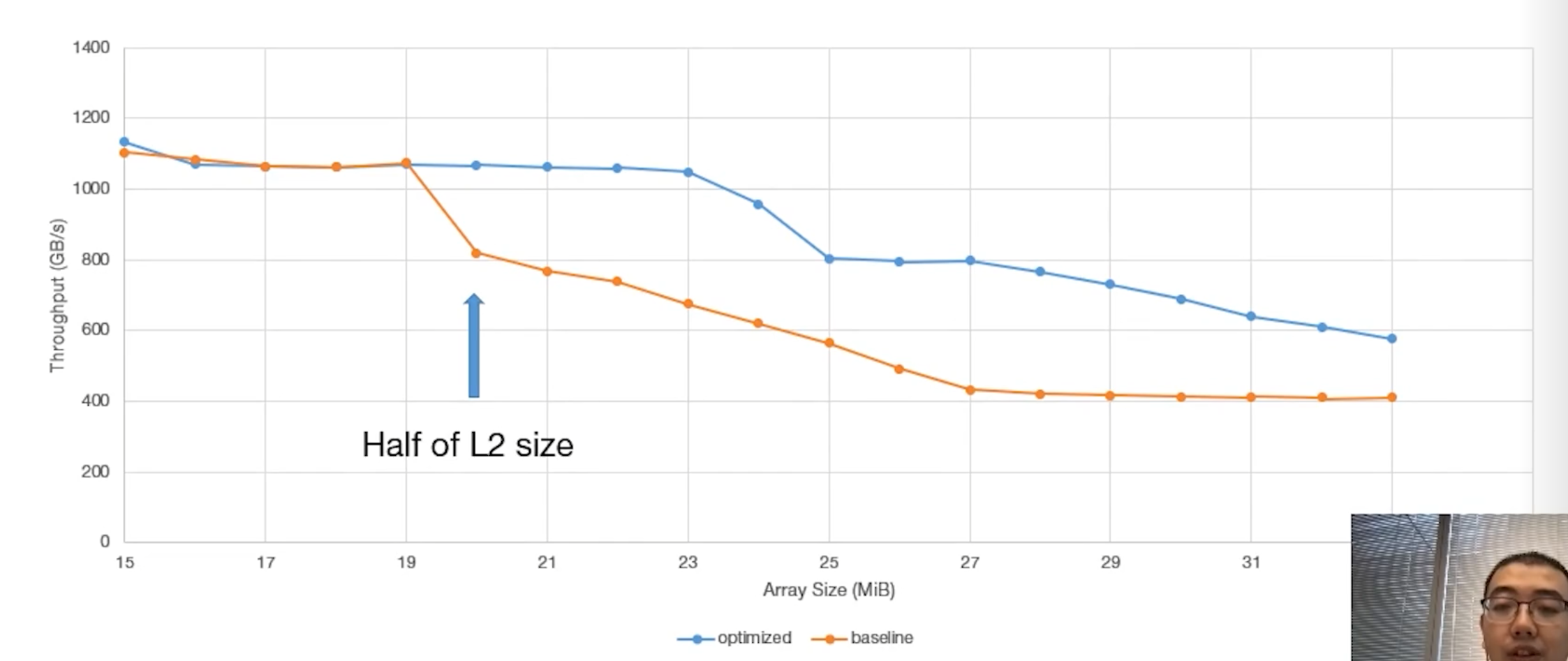
<p>The results demonstrated that co-locating both blocks on the near partition yielded an 85% increase in throughput due to more efficient utilization of the L2 cache. The figure below shows that when the requested data size exceeds 20 MB (the capacity of a single L2 partition), relying on the far partition causes a significant drop in throughput.</p>
<p><img decoding="async" loading="lazy" alt="case-study-pairs-of-partition-aware-blocks" src="https://kayzee3327.github.io/the-cuda-cache/assets/images/case-study-pairs-of-partition-aware-blocks-23ad8191acfa832ae43e861a76d51344.png" width="2246" height="947" class="img_ev3q"></p>
<h3 class="anchor anchorTargetStickyNavbar_Vzrq" id="hit-latency-access-cycles">Hit latency (Access Cycles)<a href="https://kayzee3327.github.io/the-cuda-cache/blog/gtc-2021-ampere-details-via-microbenchmarking#hit-latency-access-cycles" class="hash-link" aria-label="Direct link to Hit latency (Access Cycles)" title="Direct link to Hit latency (Access Cycles)" translate="no">​</a></h3>
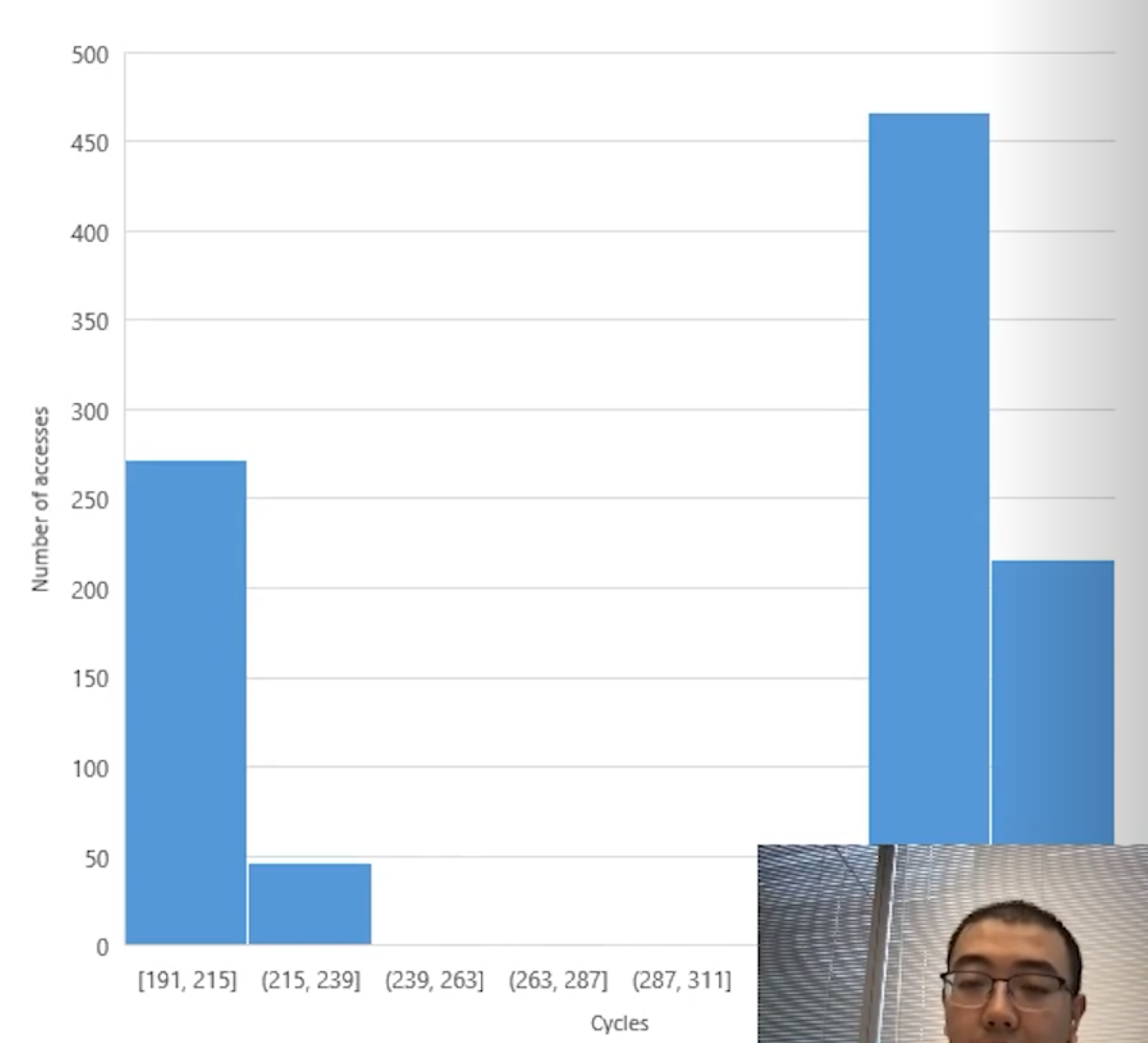
<p>This experiment demonstrates the Non-Uniform Cache Access (NUCA) architecture of NVIDIA Ampere GPUs. The test involved a single thread within a block scanning a large global array twice, deliberately bypassing the L1 cache.</p>
<ul>
<li class="">
<p>The <strong>first scan</strong> loaded the data from global memory into the L2 cache partition that corresponds to the physical address.</p>
</li>
<li class="">
<p>The <strong>second scan</strong> measured the actual L2 cache hit latency.</p>
</li>
</ul>
<p>The results revealed a clear bimodal distribution, with access times grouping around either 200 cycles or 350 cycles.</p>
<p><img decoding="async" loading="lazy" alt="hit-latency" src="https://kayzee3327.github.io/the-cuda-cache/assets/images/hit-latency-daebfa4775e20aac754d393f0254b826.png" width="1196" height="1087" class="img_ev3q"></p>
<p>This dual-peak pattern confirms that the L2 cache is physically partitioned across the massive GPU die. Data located in the near partition is retrieved faster than data residing in the far partition across the chip.</p>
<h3 class="anchor anchorTargetStickyNavbar_Vzrq" id="latency-distribution-over-all-sms">Latency distribution over all SMs<a href="https://kayzee3327.github.io/the-cuda-cache/blog/gtc-2021-ampere-details-via-microbenchmarking#latency-distribution-over-all-sms" class="hash-link" aria-label="Direct link to Latency distribution over all SMs" title="Direct link to Latency distribution over all SMs" translate="no">​</a></h3>
<h4 class="anchor anchorTargetStickyNavbar_Vzrq" id="the-setup-two-groups-two-segments">The Setup: Two Groups, Two Segments<a href="https://kayzee3327.github.io/the-cuda-cache/blog/gtc-2021-ampere-details-via-microbenchmarking#the-setup-two-groups-two-segments" class="hash-link" aria-label="Direct link to The Setup: Two Groups, Two Segments" title="Direct link to The Setup: Two Groups, Two Segments" translate="no">​</a></h4>
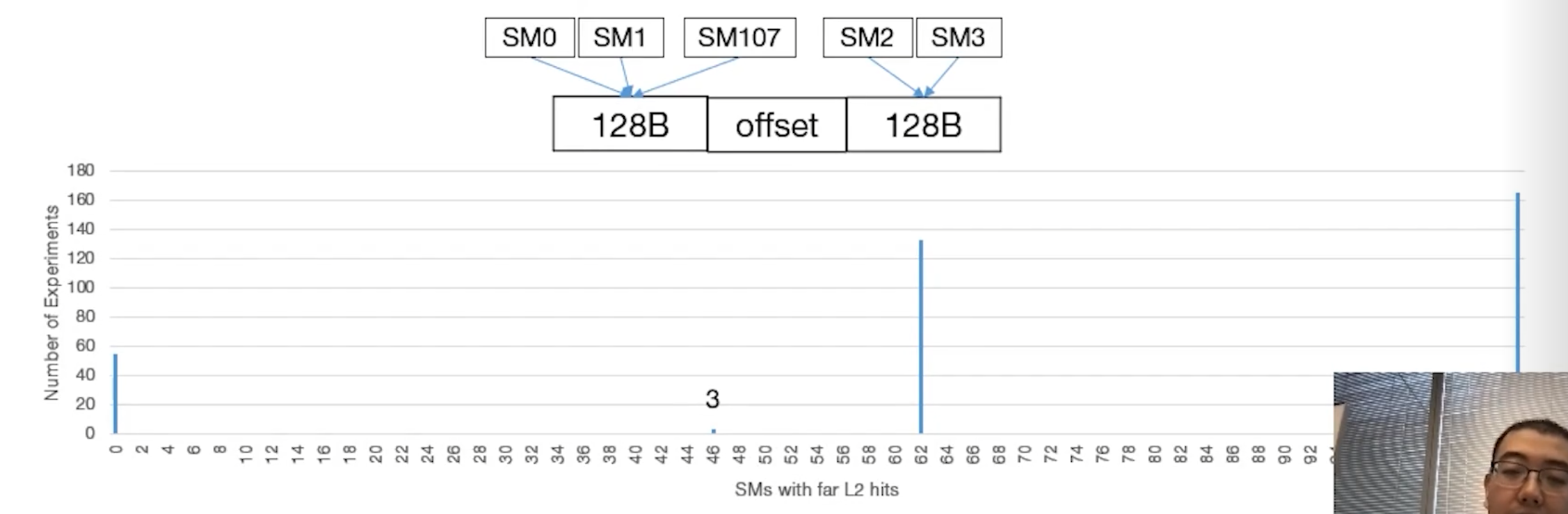
<p>The author notes there are 108 SMs in total on the chip. They split these into two groups based on assumed physical location:</p>
<ul>
<li class=""><strong>Group 0:</strong> SMs assumed to be physically near Partition 0. Let's say there are <strong>X</strong> SMs in this group.</li>
<li class=""><strong>Group 1:</strong> SMs assumed to be physically near Partition 1. Let's say there are <strong>Y</strong> SMs in this group.</li>
<li class="">We know that <strong>X + Y = 108</strong>.</li>
</ul>
<p>The experiment dictates that Group 0 <em>only</em> reads "Memory Segment A" and Group 1 <em>only</em> reads "Memory Segment B".</p>
<h4 class="anchor anchorTargetStickyNavbar_Vzrq" id="the-variable-tricking-the-hardware-hash">The Variable: Tricking the Hardware Hash<a href="https://kayzee3327.github.io/the-cuda-cache/blog/gtc-2021-ampere-details-via-microbenchmarking#the-variable-tricking-the-hardware-hash" class="hash-link" aria-label="Direct link to The Variable: Tricking the Hardware Hash" title="Direct link to The Variable: Tricking the Hardware Hash" translate="no">​</a></h4>
<p>By constantly changing the <code>offset</code> (the empty space between Segment A and Segment B), the author forces the GPU's hardware memory controller to <strong>randomly map those two segments</strong> into the two L2 cache partitions.</p>
<p>Because there are two memory segments and two cache partitions, there are only <strong>four possible ways</strong> the hardware can map them during any given run.</p>
<h4 class="anchor anchorTargetStickyNavbar_Vzrq" id="the-four-permutations-the-deduction">The Four Permutations (The Deduction)<a href="https://kayzee3327.github.io/the-cuda-cache/blog/gtc-2021-ampere-details-via-microbenchmarking#the-four-permutations-the-deduction" class="hash-link" aria-label="Direct link to The Four Permutations (The Deduction)" title="Direct link to The Four Permutations (The Deduction)" translate="no">​</a></h4>
<p>By running the experiment many times with different offsets, the author captures all four possible mapping scenarios. Let's look at the expected "Far L2 Hits" for each:</p>
<ul>
<li class="">Scenario 1: Perfect Match (0 Far Hits)<!-- -->
<ul>
<li class="">Segment A maps to Partition 0. Segment B maps to Partition 1.</li>
<li class="">Group 0 reads from its near partition. Group 1 reads from its near partition.</li>
<li class=""><strong>Result:</strong> 0 SMs experience far hits. This matches the spike at <strong>0</strong> on the graph.</li>
</ul>
</li>
<li class="">Scenario 2: Total Mismatch (108 Far Hits)<!-- -->
<ul>
<li class="">Segment A maps to Partition 1. Segment B maps to Partition 0.</li>
<li class="">Group 0 has to cross the chip. Group 1 has to cross the chip.</li>
<li class=""><strong>Result:</strong> All 108 SMs experience far hits. This matches the spike at <strong>108</strong> on the graph (mentioned in text).</li>
</ul>
</li>
<li class="">Scenario 3: Both Segments in Partition 0 (Y Far Hits)<!-- -->
<ul>
<li class="">Segment A maps to Partition 0. Segment B maps to Partition 0.</li>
<li class="">Group 0 gets a near hit (0 far hits). Group 1 has to cross the chip to get its data.</li>
<li class=""><strong>Result:</strong> Only the SMs in Group 1 experience far hits. Therefore, the number of far hits equals <strong>Y</strong>.</li>
</ul>
</li>
<li class=""><strong>Scenario 4: Both Segments in Partition 1 (X Far Hits)</strong>
<ul>
<li class="">Segment A maps to Partition 1. Segment B maps to Partition 1.</li>
<li class="">Group 0 has to cross the chip to get its data. Group 1 gets a near hit (0 far hits).</li>
<li class=""><strong>Result:</strong> Only the SMs in Group 0 experience far hits. Therefore, the number of far hits equals <strong>X</strong>.</li>
</ul>
</li>
</ul>
<h4 class="anchor anchorTargetStickyNavbar_Vzrq" id="the-conclusion">The Conclusion<a href="https://kayzee3327.github.io/the-cuda-cache/blog/gtc-2021-ampere-details-via-microbenchmarking#the-conclusion" class="hash-link" aria-label="Direct link to The Conclusion" title="Direct link to The Conclusion" translate="no">​</a></h4>
<p>Looking at the graph, the only two numbers that appear between 0 and 108 are <strong>46</strong> and <strong>62</strong>.</p>
<p><img decoding="async" loading="lazy" alt="hit-latency-dist" src="https://kayzee3327.github.io/the-cuda-cache/assets/images/hit-latency-dist-e9bb75e4c172c7a413080e8eda8e8d4b.png" width="2254" height="739" class="img_ev3q"></p>
<p>Because Scenario 3 and Scenario 4 uniquely isolate the exact number of SMs in Group 1 (Y) and Group 0 (X), the author can definitively conclude that the two groups consist of 46 SMs and 62 SMs.</p>
<p>Furthermore, checking the math confirms the deduction: <strong>46 + 62 = 108</strong>. This perfectly accounts for all SMs on the chip, proving the asymmetrical physical design of the Ampere GPU where one cache partition serves 62 SMs and the other serves 46.</p>
<h3 class="anchor anchorTargetStickyNavbar_Vzrq" id="global-address-space-evenly-distributed-across-l2-partitions">Global address space evenly distributed across L2 partitions<a href="https://kayzee3327.github.io/the-cuda-cache/blog/gtc-2021-ampere-details-via-microbenchmarking#global-address-space-evenly-distributed-across-l2-partitions" class="hash-link" aria-label="Direct link to Global address space evenly distributed across L2 partitions" title="Direct link to Global address space evenly distributed across L2 partitions" translate="no">​</a></h3>
<p>Finally, the author compared the access times of different global memory addresses at a finer granularity. They discovered that virtual addresses are mapped to L2 partitions in <strong>8-KB chunks</strong> iteratively . Furthermore, sub-slices of the L2 cache are directly associated with specific HBM memory controllers, corroborating the architectural descriptions provided in NVIDIA's official whitepaper.</p>
<h2 class="anchor anchorTargetStickyNavbar_Vzrq" id="atomics">Atomics<a href="https://kayzee3327.github.io/the-cuda-cache/blog/gtc-2021-ampere-details-via-microbenchmarking#atomics" class="hash-link" aria-label="Direct link to Atomics" title="Direct link to Atomics" translate="no">​</a></h2>
<h3 class="anchor anchorTargetStickyNavbar_Vzrq" id="shared-memory-atomics-a-new-contention-free-increment">Shared memory atomics: a new, contention-free increment<a href="https://kayzee3327.github.io/the-cuda-cache/blog/gtc-2021-ampere-details-via-microbenchmarking#shared-memory-atomics-a-new-contention-free-increment" class="hash-link" aria-label="Direct link to Shared memory atomics: a new, contention-free increment" title="Direct link to Shared memory atomics: a new, contention-free increment" translate="no">​</a></h3>
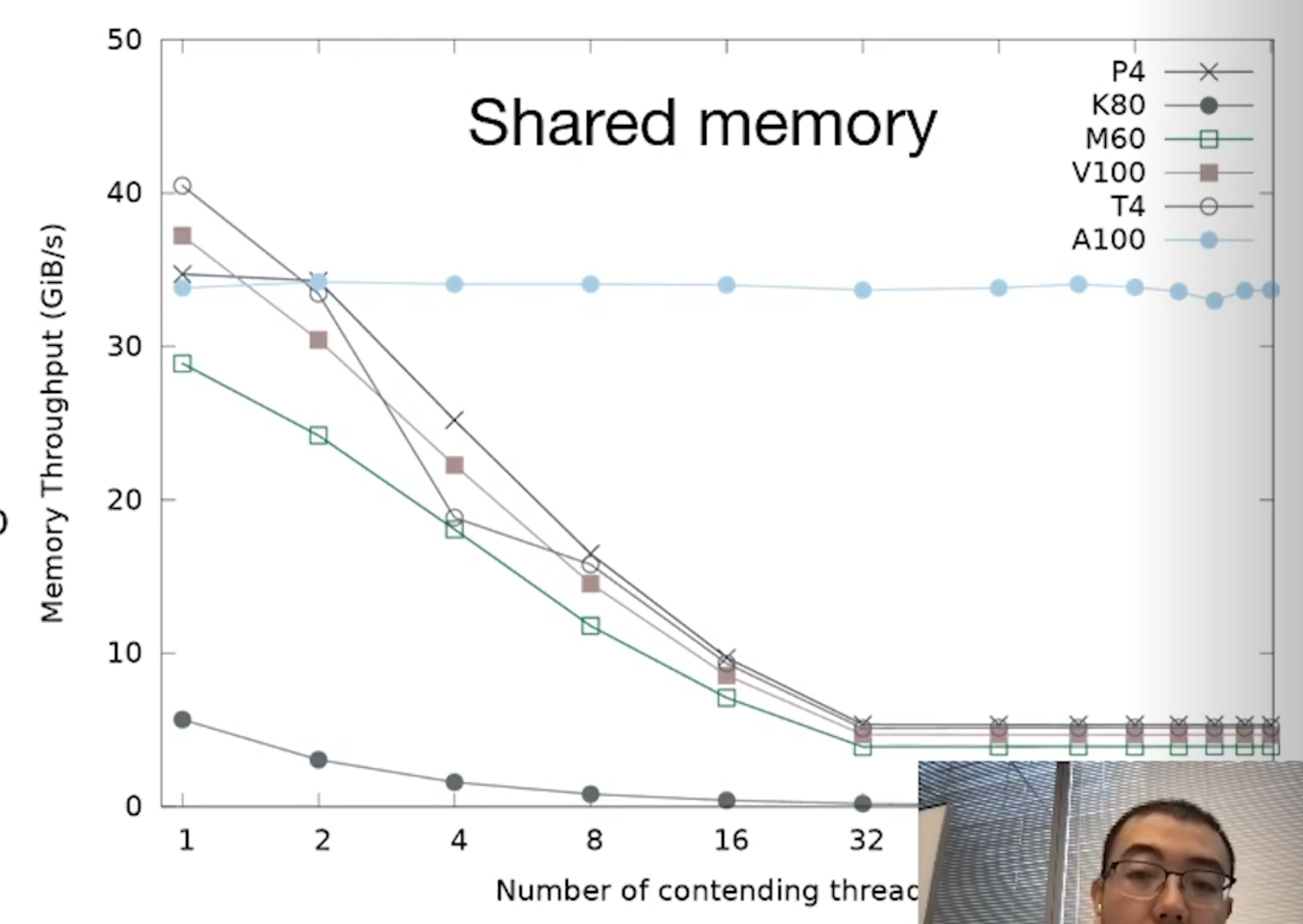
<p>Ampere introduces a powerful new atomic increment instruction: <code>ATOMS.POPC.INC</code>. Traditionally, atomic instructions can bottleneck execution; when multiple threads attempt to operate on a single memory address simultaneously, hardware contention occurs. This leads to thread stalls and a significant drop in throughput.</p>
<p>The author conducted experiments on multiple generations of GPU. They reveal that only Ampere's atomic increment does not suffer from throughput drop. However, it is important to note that adding values other than 1 still relies on the legacy <code>ATOMS.ADD</code> operation. Contention penalties still exist.</p>
<p><img decoding="async" loading="lazy" alt="atomic-contention" src="https://kayzee3327.github.io/the-cuda-cache/assets/images/atomic-contention-fbe7639126d85e5d4be1c38457fd306c.png" width="1469" height="1042" class="img_ev3q"></p>
<h4 class="anchor anchorTargetStickyNavbar_Vzrq" id="experiment-setup">Experiment Setup<a href="https://kayzee3327.github.io/the-cuda-cache/blog/gtc-2021-ampere-details-via-microbenchmarking#experiment-setup" class="hash-link" aria-label="Direct link to Experiment Setup" title="Direct link to Experiment Setup" translate="no">​</a></h4>
<p>To test this, the author designed a benchmark: N threads within a 256-thread block atomically increment a shared memory location by an immediate value of 1.</p>
<ul>
<li class="">The value of N was varied from 1 to 256,</li>
<li class="">and every N threads assigned to sequential memory addresses.</li>
</ul>
<h4 class="anchor anchorTargetStickyNavbar_Vzrq" id="all-other-atomics-still-suffer-from-contention">All other atomics still suffer from contention<a href="https://kayzee3327.github.io/the-cuda-cache/blog/gtc-2021-ampere-details-via-microbenchmarking#all-other-atomics-still-suffer-from-contention" class="hash-link" aria-label="Direct link to All other atomics still suffer from contention" title="Direct link to All other atomics still suffer from contention" translate="no">​</a></h4>
<p>The author also designed experiments for other atomic operations.</p>
<p><img decoding="async" loading="lazy" alt="atomic-contention-other" src="https://kayzee3327.github.io/the-cuda-cache/assets/images/atomic-contention-other-2239ff8f2241d95effb9bb3e55d9cf9b.png" width="2247" height="778" class="img_ev3q"></p>
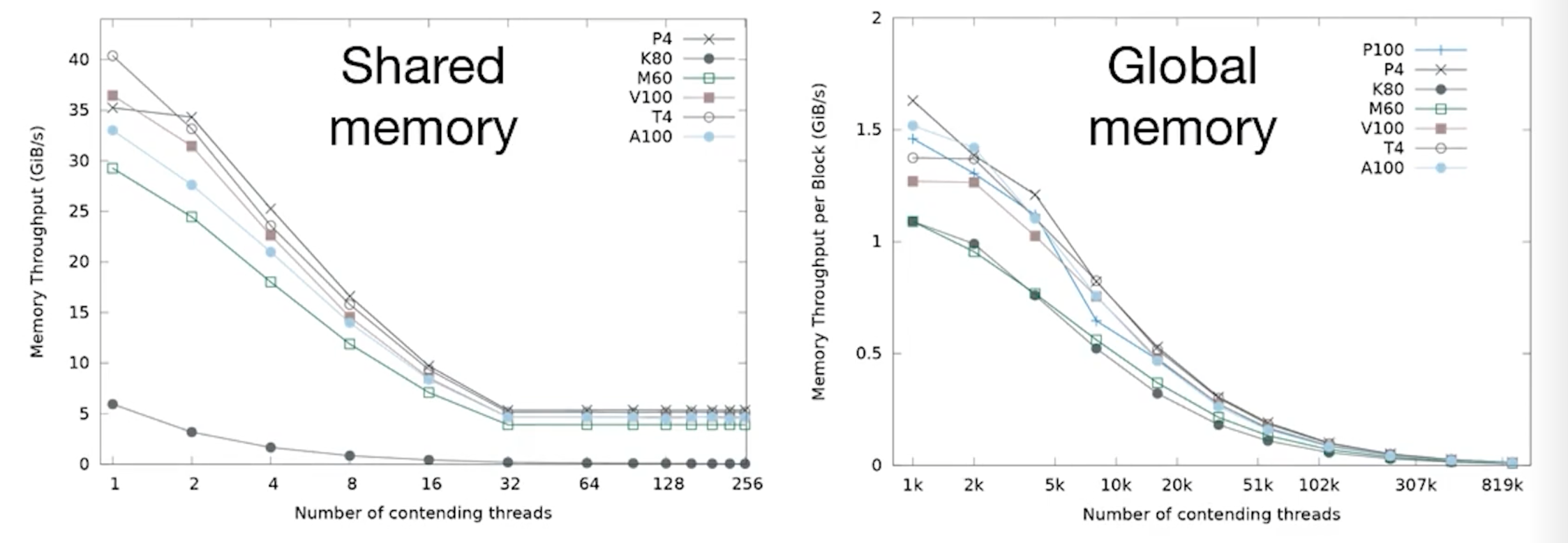
<p>When benchmarking other atomics, throughput consistently drops due to contention across both shared and global memory. Comparing Ampere's performance to older architectures reveals the following:</p>
<ul>
<li class=""><strong>Shared Memory:</strong> Ampere performs slightly worse than the V100.</li>
<li class=""><strong>Global Memory:</strong> Ampere performs slightly better than the V100.</li>
<li class=""><strong>P4 and T4 GPUs:</strong> Interestingly, these older architectures yield the best throughput in these specific scenarios, primarily due to their higher base clock frequencies.</li>
</ul>
<h2 class="anchor anchorTargetStickyNavbar_Vzrq" id="sparse-matrix-multiplication">Sparse Matrix Multiplication<a href="https://kayzee3327.github.io/the-cuda-cache/blog/gtc-2021-ampere-details-via-microbenchmarking#sparse-matrix-multiplication" class="hash-link" aria-label="Direct link to Sparse Matrix Multiplication" title="Direct link to Sparse Matrix Multiplication" translate="no">​</a></h2>
<p>For a deep dive into Ampere's Sparse Matrix Multiplication capabilities, please refer to the official NVIDIA architecture whitepapers.</p>
<h2 class="anchor anchorTargetStickyNavbar_Vzrq" id="a100-vs-v100">A100 vs V100<a href="https://kayzee3327.github.io/the-cuda-cache/blog/gtc-2021-ampere-details-via-microbenchmarking#a100-vs-v100" class="hash-link" aria-label="Direct link to A100 vs V100" title="Direct link to A100 vs V100" translate="no">​</a></h2>
<p>When comparing the A100 directly to its predecessor, the V100, several core architectural elements remain unchanged, while memory and caching have seen massive overhauls.</p>
<h4 class="anchor anchorTargetStickyNavbar_Vzrq" id="key-similarities-to-v100">Key Similarities to V100<a href="https://kayzee3327.github.io/the-cuda-cache/blog/gtc-2021-ampere-details-via-microbenchmarking#key-similarities-to-v100" class="hash-link" aria-label="Direct link to Key Similarities to V100" title="Direct link to Key Similarities to V100" translate="no">​</a></h4>
<ul>
<li class="">Instruction encoding</li>
<li class="">Dual-port registers</li>
<li class="">Shared memory latency behavior (specifically regarding bank conflicts)</li>
<li class="">Overall memory topology</li>
</ul>
<h4 class="anchor anchorTargetStickyNavbar_Vzrq" id="key-differences-from-v100">Key Differences from V100<a href="https://kayzee3327.github.io/the-cuda-cache/blog/gtc-2021-ampere-details-via-microbenchmarking#key-differences-from-v100" class="hash-link" aria-label="Direct link to Key Differences from V100" title="Direct link to Key Differences from V100" translate="no">​</a></h4>
<ul>
<li class="">Bank conflicts on the A100 result in <strong>higher latency penalties</strong> than on the V100.</li>
</ul>
<h3 class="anchor anchorTargetStickyNavbar_Vzrq" id="memory-capacity">Memory Capacity<a href="https://kayzee3327.github.io/the-cuda-cache/blog/gtc-2021-ampere-details-via-microbenchmarking#memory-capacity" class="hash-link" aria-label="Direct link to Memory Capacity" title="Direct link to Memory Capacity" translate="no">​</a></h3>
<p><img decoding="async" loading="lazy" alt="a100-memory-capacity" src="https://kayzee3327.github.io/the-cuda-cache/assets/images/a100-memory-capacity-a8525f467a420a39da849f8087ab6f87.png" width="1192" height="1003" class="img_ev3q"></p>
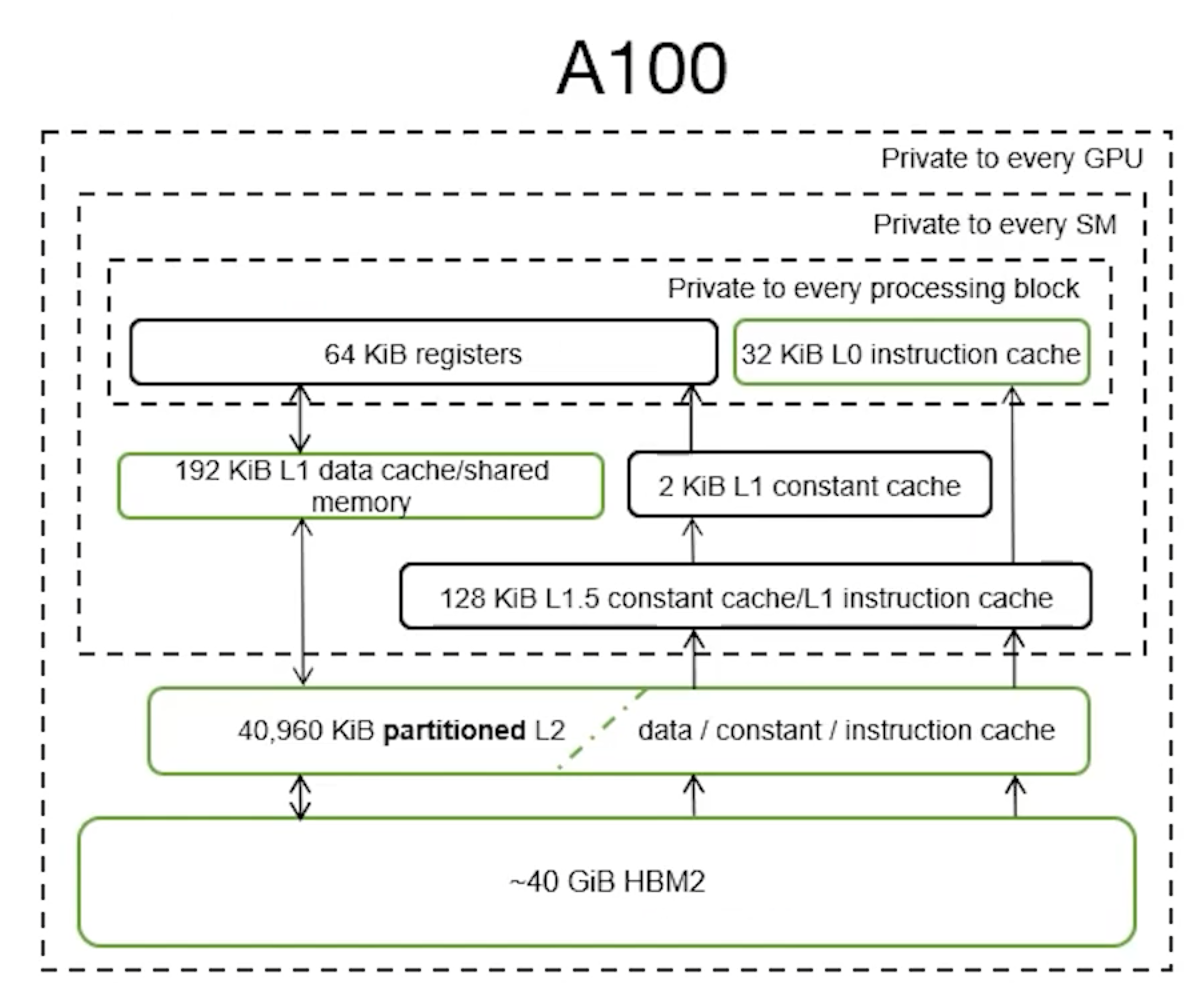
<p>The A100 features significantly expanded memory structures across the board:</p>
<ul>
<li class=""><strong>L0 Instruction Cache:</strong> 2.7x larger (verified via micro-benchmarking).</li>
<li class=""><strong>L1 &amp; Shared Memory:</strong> Total combined capacity is 1.5x larger.<!-- -->
<ul>
<li class="">Achieves 96% utilization of the theoretical L1 maximum.</li>
<li class="">Allows 100% utilization of shared memory (with only 1 KiB reserved).</li>
</ul>
</li>
<li class=""><strong>Unified L2 Cache:</strong> More than 6x larger overall, with each individual partition growing by more than 3x.</li>
<li class=""><strong>Global Memory:</strong> 2.5x larger capacity.</li>
</ul>
<h3 class="anchor anchorTargetStickyNavbar_Vzrq" id="memory-bandwidth">Memory Bandwidth<a href="https://kayzee3327.github.io/the-cuda-cache/blog/gtc-2021-ampere-details-via-microbenchmarking#memory-bandwidth" class="hash-link" aria-label="Direct link to Memory Bandwidth" title="Direct link to Memory Bandwidth" translate="no">​</a></h3>
<p><img decoding="async" loading="lazy" alt="a100-memory-bandwidth" src="https://kayzee3327.github.io/the-cuda-cache/assets/images/a100-memory-bandwidth-4b274b7783ced38aa562d077a5589dd2.png" width="1185" height="970" class="img_ev3q"></p>
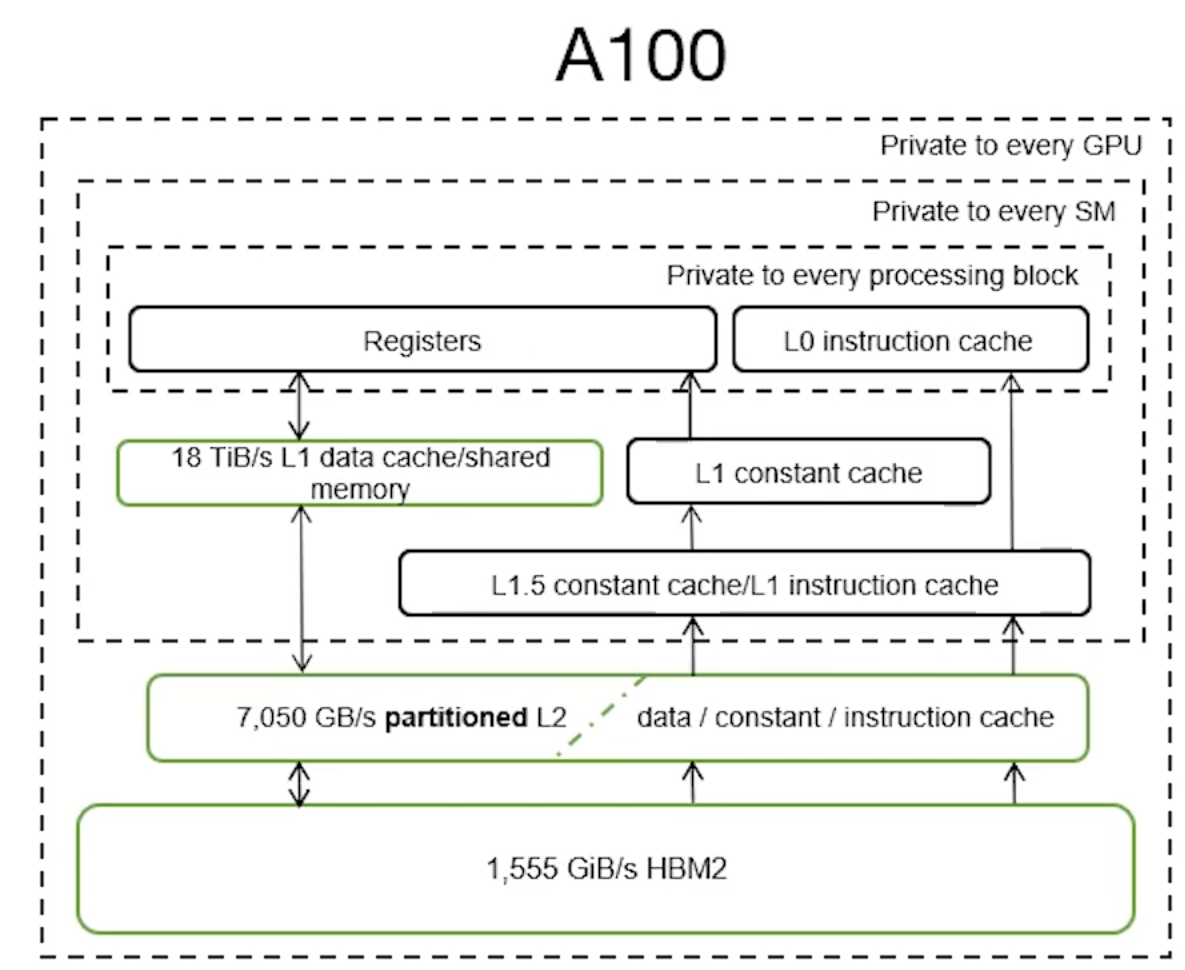
<p>Bandwidth has been scaled up significantly to feed the larger caches and higher SM count:</p>
<ul>
<li class=""><strong>Global Memory Bandwidth:</strong> 1.7x faster<!-- -->
<ul>
<li class="">More than 1.4x increase in memory clock speed</li>
</ul>
</li>
<li class=""><strong>L2 Memory Bandwidth:</strong> 2.6x faster<!-- -->
<ul>
<li class="">More than 3% increase in graphics clock</li>
</ul>
</li>
<li class=""><strong>Shared memory bandwidth</strong>: 1.4x faster<!-- -->
<ul>
<li class="">Same as L1 which is co-located</li>
<li class="">Proportional to increase in SM count from 80 to 108 and the increase in graphics clock</li>
</ul>
</li>
<li class="">Observed-theoretical ratio is over V100<!-- -->
<ul>
<li class="">Global memory and L1 with 92% theoretical maximum</li>
</ul>
</li>
</ul>]]></content>
        <author>
            <name>Kaize Wang</name>
            <email>kayzee3327@163.com</email>
            <uri>https://github.com/kayzee3327</uri>
        </author>
        <category label="Ampere" term="Ampere"/>
        <category label="L2 Cache" term="L2 Cache"/>
        <category label="Atomics" term="Atomics"/>
        <category label="Memory Hierarchy" term="Memory Hierarchy"/>
    </entry>
    <entry>
        <title type="html"><![CDATA[[WP] L2 Cache and DRAM Architecture: Summary]]></title>
        <id>https://kayzee3327.github.io/the-cuda-cache/blog/l2-cache-dram-whitepaper</id>
        <link href="https://kayzee3327.github.io/the-cuda-cache/blog/l2-cache-dram-whitepaper"/>
        <updated>2026-05-08T00:00:00.000Z</updated>
        <summary type="html"><![CDATA[This blog summarizes basic architectural information of Device Memory and L2 Cache from NVIDIA's]]></summary>
        <content type="html"><![CDATA[<p>This blog summarizes basic architectural information of Device Memory and L2 Cache from NVIDIA's</p>
<ul>
<li class=""><a href="https://images.nvidia.com/aem-dam/en-zz/Solutions/data-center/nvidia-ampere-architecture-whitepaper.pdf" target="_blank" rel="noopener noreferrer" class="">Ampere Whitepaper</a></li>
<li class=""><a href="https://resources.nvidia.com/en-us-hopper-architecture/nvidia-h100-tensor-c" target="_blank" rel="noopener noreferrer" class="">Hopper Whitepaper</a></li>
</ul>
<p>The global and local memory areas accessed by CUDA programs reside in HBM memory space, i.e., “device memory”.</p>
<ul>
<li class="">Constant memory space resides in device memory and is cached in the constant cache.</li>
<li class="">Texture and surface memory spaces reside in device memory. They are cached in texture cache.</li>
<li class="">The Level 2 (L2) cache caches reads from and writes to HBM (device) memory. It services memory requests from various subsystems within the GPU.</li>
</ul>
<p>HBM and L2 memory spaces are accessible to all SMs and all applications running on the GPU.</p>
<h2 class="anchor anchorTargetStickyNavbar_Vzrq" id="device-memory-dram-overview">Device Memory (DRAM) Overview<a href="https://kayzee3327.github.io/the-cuda-cache/blog/l2-cache-dram-whitepaper#device-memory-dram-overview" class="hash-link" aria-label="Direct link to Device Memory (DRAM) Overview" title="Direct link to Device Memory (DRAM) Overview" translate="no">​</a></h2>
<table><thead><tr><th></th><th>Ampere (SXM4)</th><th>Hopper (SXM5)</th><th>Hopper (PCIe)</th></tr></thead><tbody><tr><td>DRAM</td><td>40GB (HBM2, 5 stacks, 8 memory dies per stack)</td><td>80GB (HBM3, 5 stacks)</td><td>80GB (HBM2e, 5 stacks)</td></tr><tr><td>Data Rate</td><td>1215 MHz DDR</td><td>2619 MHz DDR</td><td>1593 MHz DDR</td></tr><tr><td>Bandwidth</td><td>1555 GB/sec</td><td>3352 GB/sec</td><td>2039 GB/sec</td></tr></tbody></table>
<p>For more, please check "H100 HBM and L2 Cache Memory Architectures" section of <a href="https://resources.nvidia.com/en-us-hopper-architecture/nvidia-h100-tensor-c" target="_blank" rel="noopener noreferrer" class="">Hopper Whitepaper</a>, <a href="https://developer.nvidia.com/blog/nvidia-hopper-architecture-in-depth/" target="_blank" rel="noopener noreferrer" class="">Hopper Architecture In-depth</a> and <a href="https://developer.nvidia.com/blog/nvidia-ampere-architecture-in-depth/" target="_blank" rel="noopener noreferrer" class="">Hopper Architecture In-depth</a>.</p>
<h2 class="anchor anchorTargetStickyNavbar_Vzrq" id="l2-cache">L2 Cache<a href="https://kayzee3327.github.io/the-cuda-cache/blog/l2-cache-dram-whitepaper#l2-cache" class="hash-link" aria-label="Direct link to L2 Cache" title="Direct link to L2 Cache" translate="no">​</a></h2>
<h2></h2>
<table><thead><tr><th></th><th>Ampere (SXM4)</th><th>Hopper (SXM5)</th><th>Hopper (PCIe)</th></tr></thead><tbody><tr><td>Cache Size</td><td>40MB</td><td>50MB</td><td>50MB</td></tr><tr><td>Organization</td><td>The L2 cache is divided into two partitions to enable higher bandwidth and lower latency memory access. Each L2 partition localizes and caches data for memory accesses from SMs in the GPCs directly connected to the partition.<br>Each L2 cache partition is divided into 40 L2 cache slices. Eight 512 KB L2 slices are associated with each memory controller.</td><td>Partitioned Crossbar but not necessarily 2-way split.</td><td>Partitioned Crossbar but not necessarily 2-way split.</td></tr><tr><td>Read Bandwidth</td><td>5120 Bytes/clk</td><td>Unknown</td><td>Unknown</td></tr><tr><td>Data Compression</td><td>The NVIDIA Ampere architecture adds Compute Data Compression to accelerate unstructured sparsity and other compressible data patterns.</td><td>Supported</td><td>Supported</td></tr></tbody></table>
<p>For detailed info, please refer to whitepapers.</p>]]></content>
        <author>
            <name>Kaize Wang</name>
            <email>kayzee3327@163.com</email>
            <uri>https://github.com/kayzee3327</uri>
        </author>
        <category label="Ampere" term="Ampere"/>
        <category label="Hopper" term="Hopper"/>
        <category label="L2 Cache" term="L2 Cache"/>
        <category label="Device Memory" term="Device Memory"/>
        <category label="HBM" term="HBM"/>
        <category label="Memory Hierarchy" term="Memory Hierarchy"/>
    </entry>
</feed>